How to Make a Clipart Set in Procreate: A Strategic Guide for Creators
In the modern digital landscape, visual assets are not merely decorative; they are functional tools that drive engagement, clarify communication, and reinforce brand identity. For entrepreneurs, educators, and content creators, the ability to produce custom graphics quickly and efficiently is a significant competitive advantage. Learning how to make a clipart set in Procreate offers a direct pathway to achieving this autonomy. By mastering this workflow on the iPad, you transition from relying on generic stock libraries to creating tailored visual systems that serve your specific strategic goals.
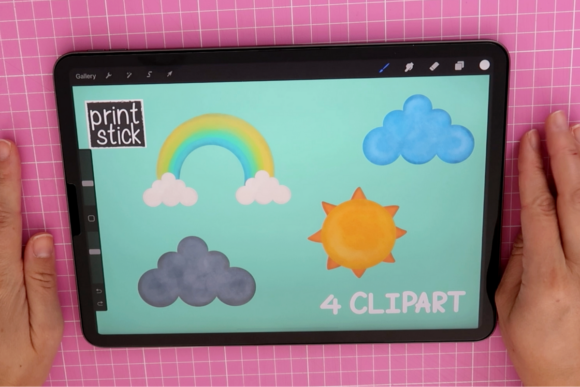
This approach is particularly valuable because it lowers the barrier to entry for high-quality design. You do not need years of formal artistic training to produce effective visuals. Instead, by leveraging basic shapes and intuitive brush tools, you can construct a cohesive library of elements—such as a cute weather clipart set—that enhances your projects. The process is less about innate talent and more about understanding the mechanics of digital construction and packaging. When executed with intention, this skill set supports broader objectives in branding, productivity, and customer experience.
The Strategic Value of Custom Visual Assets
Before diving into the technical steps, it is essential to understand why creating your own clipart is a sound business and creative decision. Many professionals underestimate the impact of consistent, original imagery on their audience’s perception. When you learn how to make a clipart set in Procreate, you are investing in asset ownership and brand differentiation.
- Brand Consistency: Stock illustrations often lack cohesion. By designing your own set, you control the color palette, line weight, and style, ensuring every graphic aligns with your brand guidelines.
- Cost Efficiency: While subscription services for stock images are common, they represent an ongoing operational cost. Creating your own library is a one-time investment of time that yields reusable assets.
- Niche Relevance: Generic icons may not perfectly fit your specific context. Custom clipart allows you to address unique nuances in your messaging, whether for educational materials, marketing campaigns, or product packaging.
Consider the example of a small business owner launching a seasonal campaign. Using a pre-made weather icon might suffice, but it lacks personality. However, a custom-drawn rain cloud or sunburst, created with a distinct hand-drawn aesthetic, creates an emotional connection with the viewer. This subtle difference can influence click-through rates and user engagement. Therefore, the act of designing is not just artistic; it is a strategic maneuver to improve communication outcomes.
Foundational Techniques: Shapes and Brushes
The core of this methodology relies on simplicity. You do not need to draw complex illustrations from scratch. Instead, you will use basic geometric shapes as the building blocks for your elements. This technique is accessible to beginners and efficient for professionals. In Procreate, the shape guide and quick shape feature allow you to create perfect circles, squares, and triangles with minimal effort. These forms become the foundation of your weather elements—a circle for the sun, a rounded rectangle for a cloud base, or triangles for raindrops.
Once the structural shapes are in place, the next step involves selecting appropriate brushes from the Procreate library. The choice of brush defines the texture and mood of your clipart. For a "cute" or approachable aesthetic, soft-edged brushes or those with slight texture can add warmth and humanity to the digital vector-like shapes. Exploring these tools allows you to give your artwork a unique look and style without requiring advanced drawing skills.
It is crucial to approach this phase with experimentation. Test different brush settings to see how they interact with your shapes. Does a rough ink brush convey the right energy? Or does a smooth monoline stroke feel more professional? These decisions should be guided by your intended audience and the platform where the clipart will be used. For instance, social media graphics often benefit from bolder, simpler lines, while printed educational materials may require finer details.
Workflow Efficiency and Planning
To maximize the return on your time investment, planning is essential before you begin drawing. Randomly creating images leads to disjointed results and wasted effort. Instead, define the scope of your clipart set. If you are making a weather set, list the essential elements: sun, cloud, rain, snow, wind, lightning, and perhaps variations like partly cloudy or stormy. This list serves as your production roadmap.
When learning how to make a clipart set in Procreate, adopt a modular mindset. Create each element on a separate layer or in a separate canvas if necessary. This organization simplifies the editing process and makes it easier to maintain consistency across the set. Use the same color palette for all elements to ensure they function as a unified family. Limiting your palette to three to five colors can streamline decision-making and enhance visual harmony.
Furthermore, consider the scalability of your designs. Since you are working on an iPad, ensure your canvas resolution is high enough to accommodate various use cases. A standard 300 DPI canvas at 2000x2000 pixels or larger is typically sufficient for most digital and print applications. Working at a higher resolution initially prevents pixelation issues later, safeguarding the quality of your final output.
Packaging and Distribution for Professional Results
Creating the artwork is only half the task. The final, often overlooked step is packaging the clipart for usability. Isa, the instructor in this class, emphasizes this critical phase. Proper packaging ensures that your clipart is ready to share, sell, or integrate into other projects seamlessly. This step transforms raw drawings into a professional product.
The industry standard for clipart is the PNG format with a transparent background. Transparency allows users to place your weather icons over any background color or image without unsightly white boxes surrounding them. In Procreate, you must hide the background layer before exporting each element individually. This process can be tedious if done manually for dozens of items, so developing a systematic export workflow is vital for productivity.
Additionally, consider organizing your files into clear folders. If you plan to upload your set to a store or share it with clients, logical naming conventions (e.g., sun_clear.png, cloud_rain.png) enhance the user experience. Good file management reflects professionalism and reduces friction for anyone using your assets. It also facilitates future updates or expansions of your clipart library.
Risks and Considerations for Intentional Use
While the benefits are clear, there are risks to approaching this process without clear goals. One common pitfall is style drift. Without a predefined aesthetic direction, your clipart set may end up looking inconsistent, with some elements appearing bold and others delicate. This inconsistency undermines brand authority and confuses the viewer. To mitigate this, establish a style guide before you start. Define your line weights, corner radii, and color codes strictly.
Another risk is over-complication. Beginners often try to add too much detail, forgetting that clipart functions best when it is simple and recognizable at small sizes. Remember that these elements are often used as supporting visuals, not the main focal point. Clarity should always take precedence over intricacy. Regularly zoom out to check if your icons remain legible and impactful at thumbnail size.
Finally, consider the legal and ethical implications if you plan to sell your work. Ensure that any brushes or reference materials you use are licensed for commercial use. Procreate’s default brushes are generally safe, but third-party downloads may have restrictions. Due diligence in this area protects your business from potential intellectual property disputes.
Long-Term Benefits for Creatives and Entrepreneurs
Mastering how to make a clipart set in Procreate is not just about completing a single project; it is about building a sustainable creative capability. As you refine this skill, you will find that you can produce visual content faster and with greater alignment to your strategic needs. This agility allows you to respond quickly to market trends, seasonal changes, or new content opportunities.
For educators, this means creating engaging lesson materials that resonate with students. For marketers, it means producing unique social media assets that stand out in crowded feeds. For small business owners, it means reducing dependency on external designers for minor updates. The cumulative effect is increased operational efficiency and stronger brand equity.
Moreover, this process fosters a deeper understanding of visual communication. By deconstructing images into basic shapes and textures, you develop an eye for design principles that apply across all media. This heightened visual literacy improves your decision-making in other areas, such as layout design, presentation decks, and website aesthetics.
In conclusion, the journey to create a cute weather clipart set in Procreate is a practical exercise in strategic creativity. It combines technical skill with thoughtful planning to produce assets that deliver real value. By focusing on consistency, usability, and intentional design, you transform a simple drawing activity into a powerful tool for achieving your professional goals. Whether you are new to Procreate or an experienced user, adopting this structured approach ensures that your efforts yield high-quality, versatile results that support your long-term success.