Painting Brushes on Palette: Elevating Your Embroidery with Artistic Flair
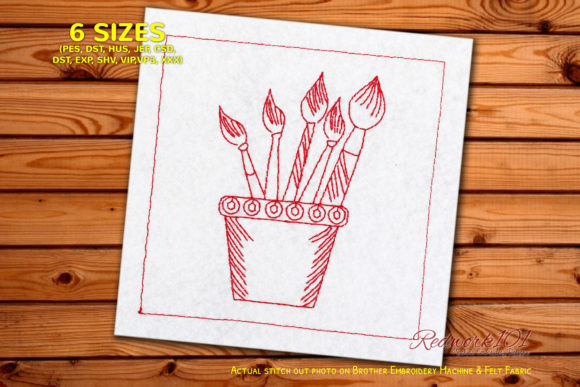
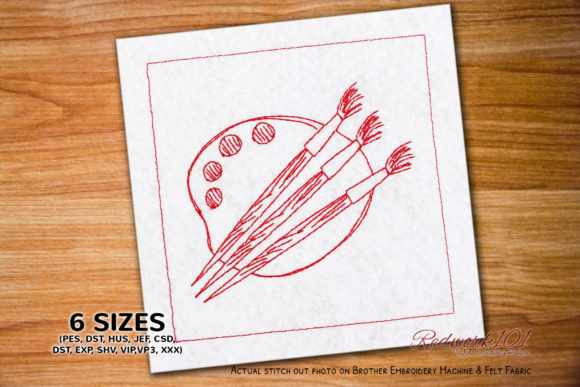
There is a distinct joy in watching a digital design transform into tangible texture under the needle of an embroidery machine. For creative minds seeking to blend traditional artistic motifs with modern crafting techniques, the Painting Brushes on Palette design offers a charming intersection of visual art and textile craft. This lovely redwork embroidery pattern is not merely a decoration; it is a statement piece for those who appreciate the whimsical side of creation. It is fun, easy to stitch, and adds immediate personality to tote bags, aprons, wall hangings, or garment accents.
However, even the most straightforward designs can trip up enthusiasts if approached without attention to detail. Whether you are a seasoned professional running a small business or a hobbyist just starting your journey, understanding the nuances of this specific file type can save you time, thread, and frustration. Let’s explore how to get the most out of this artistic motif while avoiding common pitfalls that often go unnoticed until the hoop is removed.
Understanding the Redwork Appeal
Redwork embroidery has seen a massive resurgence because of its simplicity and high-impact aesthetic. Traditionally stitched in a single color—often red, hence the name—this style relies on clean lines and negative space rather than complex shading. The Painting Brushes on Palette design leverages this tradition perfectly. It appeals to artists, teachers, and crafters because it visually communicates creativity without overwhelming the fabric.
Many beginners mistakenly assume that "simple" means "rushed." They treat redwork as a filler project, neglecting the precision required for clean lines. When you skip proper stabilization or use low-quality thread, the artistic integrity of the brushes and palette can suffer, resulting in puckering or uneven stitches. Remember, the charm of this design lies in its crispness. A well-executed redwork piece looks intentional and polished, while a poorly executed one can look like a mistake.
The Box Stitch Misconception
One of the most frequent points of confusion involves the optional Box Stitch mentioned in the design specifications. In the preview images, you will often see an outer box framing the painting tools. Many users assume this box is an integral part of the artistic composition, necessary for the design to make sense. This is a misunderstanding that can limit your creative application.
In reality, the color of the outer box is different in most variations of this design specifically to indicate that it is a placement or border element, not necessarily part of the final aesthetic unless you choose it to be. If you do not want the box, you can skip that color step directly in your machine’s interface. Failing to realize this flexibility can lead to cluttered designs, especially if you are stitching on a small item like a pocket or a cuff where space is premium.
Better Approach: Before stitching, review the color stop sequence in your embroidery software or machine manual. If the box does not serve a functional purpose (such as framing a patch) or an aesthetic one you desire, simply bypass it. This allows the brushes and palette to stand alone, creating a cleaner, more modern look that integrates seamlessly into larger compositions.
Navigating File Formats and Machine Compatibility
This machine embroidery file comes with multiple embroidery file formats, designed to work across various brands and models. While this versatility is a significant advantage, it introduces another common error: selecting the wrong format for your specific machine. Users often download the entire zip folder and guess which file to load, or worse, they convert files unnecessarily using third-party software, which can distort stitch density and pull compensation.
Using an incompatible or poorly converted file can result in thread breaks, bird’s nests (tangled thread underneath), or design distortion. For instance, loading a file formatted for a large commercial hoop into a small home-machine hoop without resizing can cause the machine to crash or stitch off the fabric entirely.
- Check your machine’s native format: Most machines have a preferred format (e.g., PES for Brother, DST for industrial machines, JEF for Janome). Use the file that matches your machine natively whenever possible.
- Verify hoop size: Ensure the design dimensions fit within your chosen hoop with adequate margin for clamping.
- Avoid unnecessary conversion: Only convert files if your machine strictly does not support any of the provided formats. Always preview the converted file in software before stitching.
Material Selection and Stabilization
Because the Painting Brushes on Palette design is described as easy to stitch, some crafters overlook the importance of stabilization. Redwork, with its continuous lines, can easily pull lightweight fabrics out of shape. Using no stabilizer or the wrong type can ruin an otherwise perfect project.
If you are stitching on a stretchy fabric like a t-shirt or a thin cotton blouse, a cut-away stabilizer is often recommended to provide lasting support. For woven fabrics like canvas tote bags or denim, a tear-away may suffice. Ignoring this distinction can lead to puckering around the handles of the brushes or the edges of the palette, detracting from the professional finish you aim to achieve.
Additionally, consider the thread weight. Standard 40-weight polyester thread is usually ideal for this type of design. Using heavier 30-weight thread might make the details of the brush bristles look bulky, while finer 60-weight thread might lack the visual presence needed for redwork to pop. Test your thread choice on a scrap piece of the same fabric to gauge the visual balance before committing to the final piece.
Maximizing Creative Application
Finally, think beyond the obvious placements. While this design is lovely on a standard quilt block, its true potential shines when integrated into functional items for creative professionals. Imagine this embroidery on a canvas artist’s apron, a linen notebook cover, or a zippered pouch for holding actual paintbrushes. The thematic connection between the design and the item enhances the perceived value and thoughtfulness of the creation.
For entrepreneurs and small business owners, this design offers a quick turnaround product. Because it is fast to stitch, it allows for efficient production runs. However, ensure consistency in your tension settings across all units. Inconsistent tension can make identical designs look different, affecting brand quality perception.
Before making your final decision to purchase or download, check the license terms if you plan to sell finished goods. Ensure you understand the usage rights associated with the file. Most designers allow physical sales of finished items but prohibit the resale or sharing of the digital file itself. Respecting these boundaries supports the creative ecosystem and ensures you can continue accessing high-quality designs like this one.
By paying attention to these details—skipping unnecessary borders, choosing the right file format, stabilizing correctly, and thinking creatively about application—you transform a simple embroidery file into a standout piece of art. The Painting Brushes on Palette is more than just a pattern; it is an invitation to stitch with intention and pride.