Mastering Watercolor Paint Brushes for Digital & Print
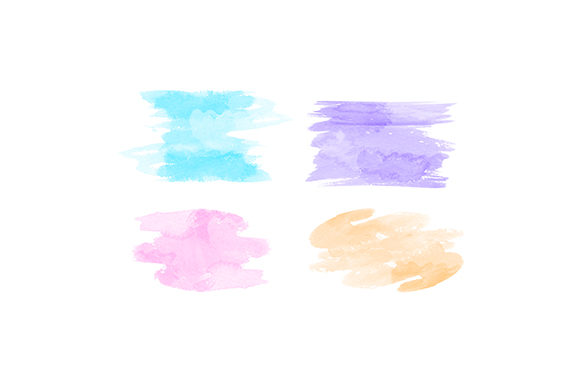
There is a distinct, organic charm to watercolor art that digital tools often struggle to replicate. The way pigment bleeds into paper, the unpredictable granulation, and the soft, translucent layers create an aesthetic that feels both professional and deeply human. For designers, educators, and creators, accessing this look without the mess of physical paints is a game-changer. This is where high-quality watercolor paint brushes in digital formats become essential assets. Whether you are designing a wedding invitation, creating educational materials, or branding a boutique business, having the right digital brush assets can elevate your work from standard to stunning.
When we talk about receiving a design in formats like SVG, Transparent PNG, EPS, and DXF, we are discussing versatility. These aren't just static images; they are functional tools that integrate seamlessly into various workflows. Understanding how to leverage these formats allows you to maintain the integrity of the watercolor effect across different mediums, from web graphics to large-format printing.
The Power of Versatile File Formats
The true value of a premium watercolor paint brushes pack lies not just in the artistic quality of the strokes, but in the technical flexibility provided by the file types. Each format serves a specific purpose in the modern creative ecosystem.
- SVG (Scalable Vector Graphics): This is crucial for web designers and developers. SVGs allow the brush strokes to scale infinitely without losing resolution. You can use them for website headers, icons, or interactive elements where load speed and crispness on retina displays matter.
- Transparent PNG: Perhaps the most immediately useful format for many creators. With a transparent background, you can drag and drop these brush strokes directly into Photoshop, Canva, or Procreate. They layer perfectly over text or photos, making them ideal for social media graphics and quick mockups.
- EPS (Encapsulated PostScript): A staple for professional print design. If you are sending files to a commercial printer for brochures, business cards, or packaging, EPS ensures that the vector data remains editable and print-ready at any size.
- DXF (Drawing Exchange Format): Often overlooked by graphic designers, this format is vital for those using cutting machines like Cricut or Silhouette. It allows crafters to cut watercolor-style shapes from vinyl or paper, bridging the gap between digital design and physical product creation.
Having access to all four formats means you are not locked into a single software ecosystem. You can start a design in Illustrator, refine it in Photoshop, and prepare it for production in a cutting software, all while maintaining the same cohesive visual language.
Enhancing Brand Identity with Organic Textures
In a digital world saturated with clean, geometric, and corporate aesthetics, brands are increasingly seeking warmth and authenticity. Watercolor paint brushes offer a way to inject personality into brand identity. Consider a wellness coach, a bakery, or a handmade jewelry store. These businesses benefit from visuals that feel approachable and artisanal.
Using watercolor elements in your logo variations, social media templates, or packaging design can communicate values such as creativity, gentleness, and bespoke quality. Unlike rigid vector shapes, watercolor strokes have irregular edges and varying opacity. This imperfection is perceived as "human," which builds trust and emotional connection with the audience. When you use these brushes consistently across your marketing materials, you create a recognizable visual signature that stands out in a crowded feed.
Practical Applications Across Industries
The utility of these digital assets extends far beyond simple illustration. Here is how different professionals can integrate watercolor paint brushes into their daily workflows:
For Educators and Publishers
Teachers and content creators often need to make learning materials engaging. Watercolor elements can soften the look of worksheets, flashcards, and presentation slides. For early childhood education, the soft colors and organic shapes are less overstimulating than bright, primary-colored clip art. You can use PNG overlays to frame text or highlight key concepts, making the material visually appealing without distracting from the educational content.
For Wedding and Event Designers
The wedding industry thrives on romance and elegance. Watercolor florals and abstract washes are staples in invitation design. By using high-resolution EPS or SVG files, designers can create custom monograms or border elements that scale perfectly for everything from save-the-date magnets to large welcome signs. The ability to edit the vector paths in Illustrator allows for precise customization to match specific color palettes.
For Digital Marketers and Bloggers
Content marketers know that visual appeal drives clicks. Using watercolor brush strokes as backgrounds for quote graphics or as underlines for headlines can increase engagement on platforms like Pinterest and Instagram. The transparent PNG format makes this incredibly efficient. Instead of spending hours painting digitally, you can drag, drop, and recolor a pre-made brush stroke to fit your brand colors in seconds. This efficiency boosts productivity, allowing you to focus on strategy rather than execution.
Selecting the Right Assets for Your Needs
Not all digital brush packs are created equal. When evaluating watercolor paint brushes for purchase or download, consider the following practical aspects:
- Resolution and Quality: For PNGs, ensure they are high-resolution (at least 300 DPI) to prevent pixelation when printed. For vectors (SVG/EPS), check that the paths are clean and not overly complex, which can slow down design software.
- Variety of Strokes: Look for packs that offer a range of textures—dry brushes, wet washes, splatters, and fine lines. A diverse set gives you more creative freedom to build depth and contrast in your compositions.
- Commercial Licensing: Always verify the license terms. If you are creating products for sale, such as print-on-demand items or client logos, ensure the asset provider grants commercial usage rights.
- Color Editability: Vector formats (SVG, EPS, DXF) should allow you to change colors easily. This is crucial for adapting the assets to different brand guidelines without needing to recreate the artwork.
Maximizing Efficiency in Your Creative Process
Integrating these assets into your library is an investment in efficiency. By building a personal toolkit of reliable watercolor paint brushes, you reduce the time spent searching for free, low-quality alternatives. You establish a consistent style that clients and audiences recognize. Moreover, because these files are digital, they are non-destructive. You can experiment with blending modes, opacity, and layering without the fear of ruining a physical piece of paper.
For freelancers and agency owners, this speed translates directly to profitability. Being able to deliver high-end, textured designs quickly allows you to take on more projects or charge a premium for rapid turnaround times. It also enables you to offer more value to clients by providing them with versatile assets they can use across their own marketing channels.
Ultimately, watercolor paint brushes in digital formats are more than just decorative elements. They are powerful tools for communication, branding, and creative expression. By understanding the strengths of SVG, PNG, EPS, and DXF files, you can unlock new possibilities in your design work, creating pieces that resonate with authenticity and professional polish. Whether you are crafting a delicate invitation or a bold social media campaign, these assets provide the perfect bridge between traditional artistry and modern digital convenience.