Building Immersive Winter Landscapes with the Huge Winter Woodland Scene Creator PNG
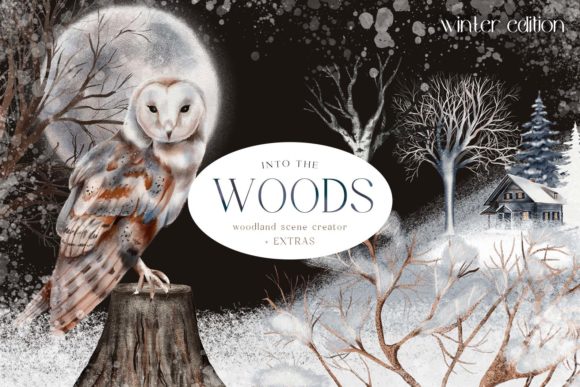
Hello and welcome. If you are a digital creator, illustrator, or small business owner looking to elevate your seasonal content, integrating high-quality assets into your workflow is essential. This article explores the practical application of the Huge Winter Woodland Scene Creator PNG, part of the new "Into The Woods Scene Creator Winter Edition." This collection is not merely a set of images; it is a comprehensive toolkit designed to streamline the creation of charming winter forest scenes. By understanding how to leverage these elements effectively, you can enhance your productivity, maintain visual consistency, and produce professional-grade designs for various commercial and personal projects.
Understanding the Asset Ecosystem
The core value of this scene creator lies in its versatility and completeness. Rather than sourcing individual elements from disparate providers, which often leads to inconsistent lighting, resolution, or artistic style, this collection provides a unified aesthetic. The package includes a vast array of components: animals, birds, trees, bushes, land elements, piles of snow, celestial bodies like the moon and sun, and atmospheric overlays such as falling snow.
For professionals, time is a critical resource. Searching for compatible assets can consume hours of a project timeline. By utilizing a cohesive scene creator, you reduce the friction associated with asset hunting. The inclusion of specific details—such as tree twigs, branches, snowy berries, fir tree branches, and pine cones—allows for granular control over the composition. This level of detail ensures that your final output feels organic and carefully curated, rather than assembled from mismatched parts.
Strategic Integration into Creative Workflows
Integrating the Huge Winter Woodland Scene Creator PNG into your workflow requires a shift from random assembly to structured layering. Whether you are designing Christmas cards, wall art, book illustrations, or stationery items, the process generally follows three phases: preparation, composition, and refinement.
Phase 1: Preparation and Organization
Before opening your design software, organize your assets. The collection includes a significant number of elements, including:
- Deer and Stags: 4 variations
- Birds: 4 variations
- Owls: 3 variations
- Squirrels: 2 variations
- Foxes: 5 standard variations and 3 archaic styles
- Wolves: 2 variations
- Wild Rabbits: 2 variations
- Weasels: 2 variations
Create folders in your digital asset management system or desktop categorized by type (e.g., "Fauna," "Flora," "Atmosphere"). This organizational step minimizes context switching during the design phase. When you know exactly where to find a specific fox variant or a snowy branch, your creative momentum remains uninterrupted. For educators and bloggers, this organization also facilitates quick retrieval for future projects, enhancing long-term efficiency.
Phase 2: Composition and Layering
The strength of PNG assets is their transparency, allowing for seamless layering. Start with your base elements. Use the land elements and piles of snow to establish the foreground and background depth. Place larger structures, such as trees and bushes, to frame your scene. This establishes the spatial context.
Next, introduce the fauna. The variety of animals allows for narrative storytelling within a single image. For instance, placing a stag in the mid-ground with a squirrel in the foreground creates depth. The inclusion of archaic foxes adds a unique stylistic twist, suitable for fantasy-themed book covers or specialized wall art. When positioning these elements, consider the light source. If you are using the included sun or moon overlays, ensure shadows and highlights on the animals align with the directional light to maintain realism.
Atmospheric elements like falling snow overlays should be applied last in the composition phase. These overlays unify the disparate elements, making them appear as if they exist in the same environment. This technique is particularly effective for creating cohesive social media graphics or digital planner decorations.
Phase 3: Refinement and Output
Once the scene is composed, use the extras provided in the collection to refine the presentation. The blank multi-colored paper cards serve as excellent backdrops, offering a textured, tactile feel to digital designs. This is ideal for mockups or printable products. Additionally, the frosted glass effect frames and overlays can be used to highlight specific areas of your design or to create space for text.
For marketers and entrepreneurs, this refinement stage is crucial for branding. Ensure that the color palette of your scene aligns with your brand identity. The multi-colored paper options provide flexibility here, allowing you to choose backgrounds that complement your logo or message without clashing with the natural tones of the woodland elements.
Practical Use Cases Across Industries
The versatility of the Huge Winter Woodland Scene Creator PNG extends beyond traditional illustration. Here is how different professionals can integrate these assets into their specific workflows:
- Small Business Owners and Retailers: Create unique holiday packaging designs or promotional social media posts. The ability to quickly assemble custom scenes allows for frequent content updates without hiring external designers for every campaign.
- Educators and Publishers: Develop engaging visual aids for winter-themed lessons or children’s books. The clear, distinct animal figures are perfect for educational materials where clarity is paramount.
- Planner and Stationery Enthusiasts: Decorate planner pages, to-do lists, and memo notes. The smaller elements, such as pine cones and berries, act as perfect stickers or bullet points, adding a touch of whimsy to productivity tools.
- Freelance Designers: Offer customized winter greeting cards or wall art to clients. The extensive library of elements enables you to offer bespoke designs rather than relying on generic templates, increasing the perceived value of your services.
Technical Considerations and Quality Control
To ensure professional results, pay attention to resolution and file formats. PNG files support transparency, which is vital for layering. However, always check the resolution of each element before scaling. Upscaling low-resolution assets can result in pixelation, detracting from the quality of your final product. Most scene creators provide high-resolution files, but verifying this beforehand prevents rework.
Compatibility is another factor. These assets work seamlessly with major design platforms such as Adobe Photoshop, Illustrator, Canva, and Procreate. If you are using web-based tools, ensure your browser supports large PNG files to avoid lag during the editing process. For those working on tablets, organizing assets into cloud storage accessible from your device can streamline the import process.
Consistency is key to a polished look. Avoid mixing these highly detailed, hand-drawn style elements with photorealistic or minimalist icons unless intentionally aiming for a collage aesthetic. The Into The Woods collection has a distinct artistic voice; respecting this coherence ensures your designs feel intentional and professional.
Maximizing Long-Term Value
Investing in a comprehensive scene creator like this yields returns beyond a single project. By building a library of pre-composed scenes, you can create templates for recurring tasks. For example, a blogger might create a standard winter header template, swapping out the animal figures each month to keep content fresh while maintaining brand recognition. Similarly, teachers can create a bank of winter-themed worksheets, reducing preparation time for future semesters.
Furthermore, the inclusion of extras like blank cards and frames encourages experimentation. Use these to test new layout ideas or to create hybrid products, such as photo frames with winter overlays for customer portraits. This adaptability ensures that the asset pack remains useful throughout the season and in subsequent years.
In conclusion, the Huge Winter Woodland Scene Creator PNG is a powerful tool for anyone involved in digital creation. By approaching its use with a structured workflow—organizing assets, layering thoughtfully, and refining with purpose—you can produce high-quality, engaging winter content efficiently. Whether you are designing for commerce, education, or personal enjoyment, this collection provides the necessary components to bring your winter visions to life with clarity and charm.